Daily sorting reports and hours for a containment-sorting crew at IQ Automotive Services.
- For
- My crew at IQ Automotive Services
- My role
- Built it, and use it every shift to write the reports
- When
- September to October 2026
- Used by
- Site supervisors at the end of a shift; IQ’s office for reports and hours
- Status
- Used every shift since late September 2026
- Built with
- Next.js 16, Supabase, zxing-wasm, Claude Haiku, ExcelJS, jsPDF, Vitest
The floor
Every number lived in more than one place.
When a supplier’s parts are suspect, a containment crew sorts every skid at the customer’s plant before the parts go on the line. We check each part, tag the rejects, and at the end of every shift report what was sorted, what was rejected, and who worked how long.
That reporting was Excel. One workbook per part, filled in by hand from the skid labels and paper notes. Hours typed again into a daily hours sheet, then again into a monthly one.
I work on this floor and I write these reports, so I built the tool I wanted at the end of my own shift.
- Places each hour was typed before: the workbook, the daily sheet, the monthly sheet
- 3
- Page for the whole end of a shift, top to bottom
- 1
- Hours the app moves between people on its own
- 0
- In use every shift since late September 2026
- Daily
One photo per skid
Barcodes first, Claude second.
Read a skid label
At the end of a shift you photograph the labels of the skids you finished. The app reads every barcode, works out which value is which, and files the skid under its part. Here’s a made-up label.
Photos stay in your browser. Nothing is uploaded.
Press Read this label. The barcodes are decoded right here, with the same library and rules the app uses.
- Part number
- Serial
- Quantity
- Supplier code
A shift, start to finish
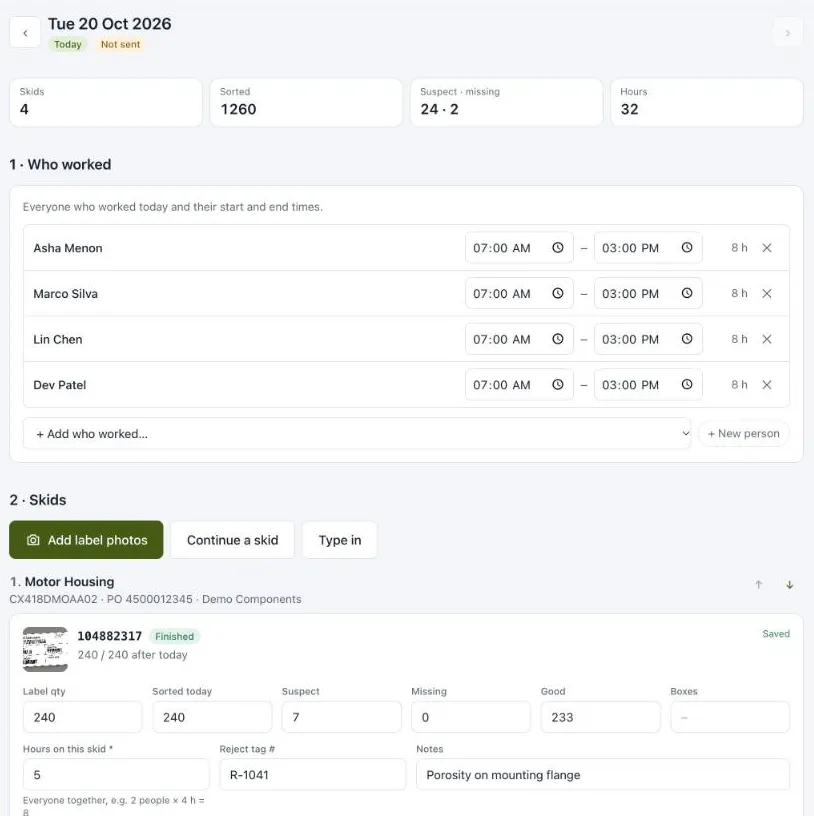
The end of a shift is one page, top to bottom.
End of a shift: pick a station
01Who worked
- Who
- The site supervisor
- Before
- Names and times on paper notes.
- Now
- Everyone’s start and end time, entered once at the top of the page.
- Where
- End of shift, on the floor
02Skid labels
- Who
- The site supervisor
- Before
- Part numbers, quantities and serials copied by hand from each label into that part’s workbook.
- Now
- Photograph the labels. The barcodes are read in the browser and each skid is filed under its part.
- Where
- On the floor, with a phone camera
03Each skid
- Who
- The site supervisor
- Before
- Filled in by hand, one workbook per part.
- Now
- Hours, suspect and missing counts, the reject tag, defect photos and who sorted it. A skid that takes two days is picked up again the next morning.
- Where
- The day page, skid by skid
04Times
- Who
- The site supervisor
- Before
- Hours typed again into a daily hours sheet.
- Now
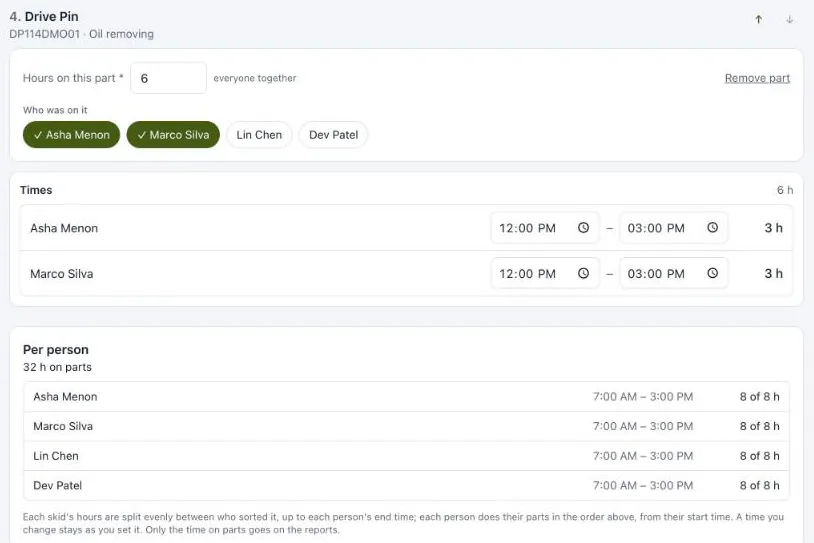
- Worked out per person and part from the skids, and editable. Anything that doesn’t add up is flagged, never fixed.
- Where
- The day page, under the skids
05Reports
- Who
- IQ’s office
- Before
- Typed again into a monthly sheet.
- Now
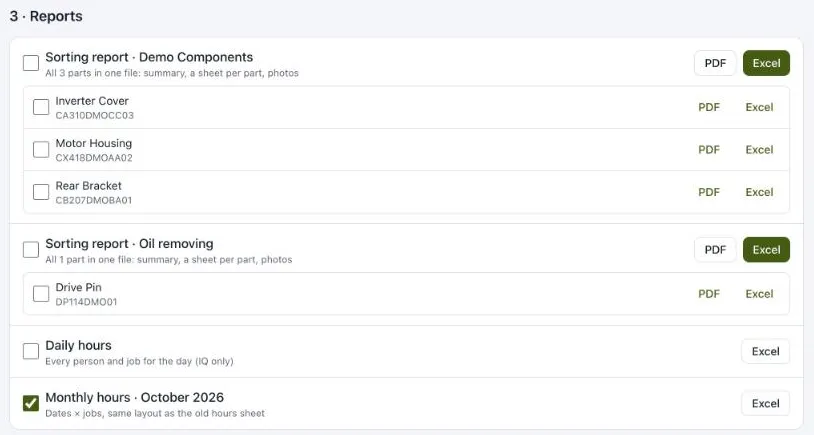
- IQ’s own format: a sorting report per customer group and per part as PDF and Excel, daily and monthly hours, or all of them as one zip.
- Where
- IQ’s office
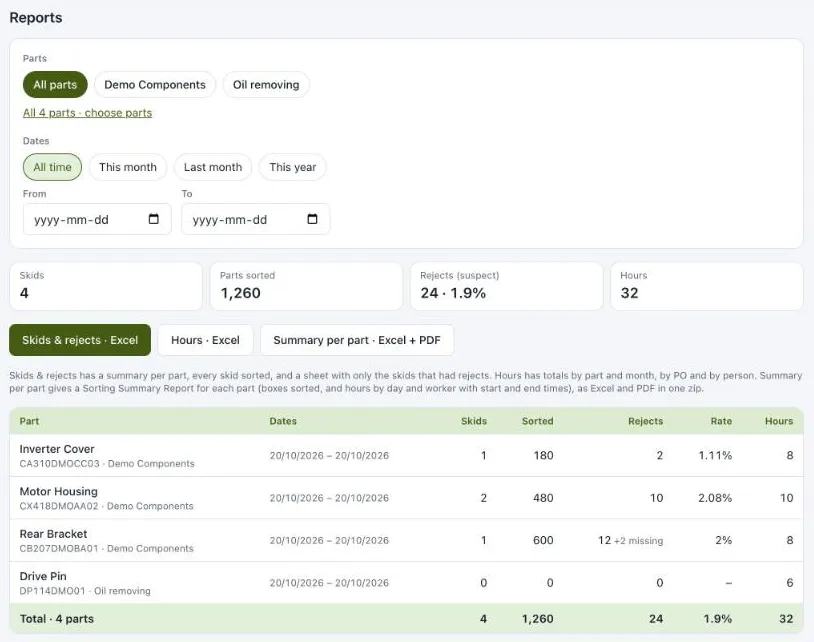
Around that page: a reports page that answers “every part we’ve done for this customer and the total rejects” for any date range; a skid board built from the customer’s skid list, oldest first, so shipping can be asked for skids in order; and a company with sites, admins, managers and supervisors, where each company only ever sees its own data.
Hours into times
Nobody on the floor writes down when they started each part.
From skid hours to everyone’s times
They know how long a skid took and who was on it. Change the hours or the crew and watch the day lay out. Push the bracket skid to 8 hours, then end Lin’s shift at 9:00, and add Asha to the bracket skid.
The app
Decisions
Barcodes first, Claude second
Barcodes are read in the browser, free and instant. Only when a label is torn or blurred does the photo go to Claude Haiku, which is asked for JSON and told to leave a field empty rather than guess a digit.
Point out problems, never fix them
Hours are pay. The app never moves time between people or parts. It splits a skid evenly, keeps everyone inside their shift, and flags what doesn’t add up: past an end time, two parts at once, hours nobody has room for.
Excel stays Excel
The office lives in spreadsheets, so the reports do too: IQ’s layout and colours, with live formulas for good parts, totals and suspect rates. Correct one number and everything that depends on it follows.
Built for more than one site
Companies, sites and roles are separate in the database, with row-level security on every table. Adding a customer plant is a new site, not a new copy of the app.
Where it is now
- Status
- Used every shift since late September 2026
- Replaced
- A workbook per part, a daily hours sheet and a monthly one
- Ready for
- More sites, each with its own supervisor and crew
What I’d change next
Bring on a second site. The data model is ready for it. What isn’t proven yet is whether another supervisor, on another floor, closes out a shift the way I do.
Measure the fallback. Barcodes handle most labels, and Claude Haiku only sees the torn or blurred ones. I’d like to count how often that happens and how often a field comes back empty, so the trade-off is a number rather than a feeling.
Reflection
Building for my own shift made the first version easy to judge: either the report was done before I left or it wasn’t. The harder call was the rule that the app never moves hours between people. Quietly balancing the numbers would have been simpler. Flagging them means a supervisor has to look, and that is the point: hours are pay.